 NAT VPN
How to connect NAT VPN in Hiddify on Linux
Prepare an active NAT VPN subscription and Hiddify for Linux. The screenshots show the Russian interface and a demonstration dashboard account; use your own link in the app. The green outline marks the control you need.
Install the app
Install Hiddify for Linux using the official link below.
Open the app at least once.

Russian NAT VPN dashboard for Linux, with Hiddify selected. This is a demonstration account; use your own subscription. The green outline marks the control.
Open your subscription in the dashboard
In the NAT VPN dashboard, open Connection.
Select this same app and press Add NAT VPN.
For manual import, expand App did not open? and copy the link.
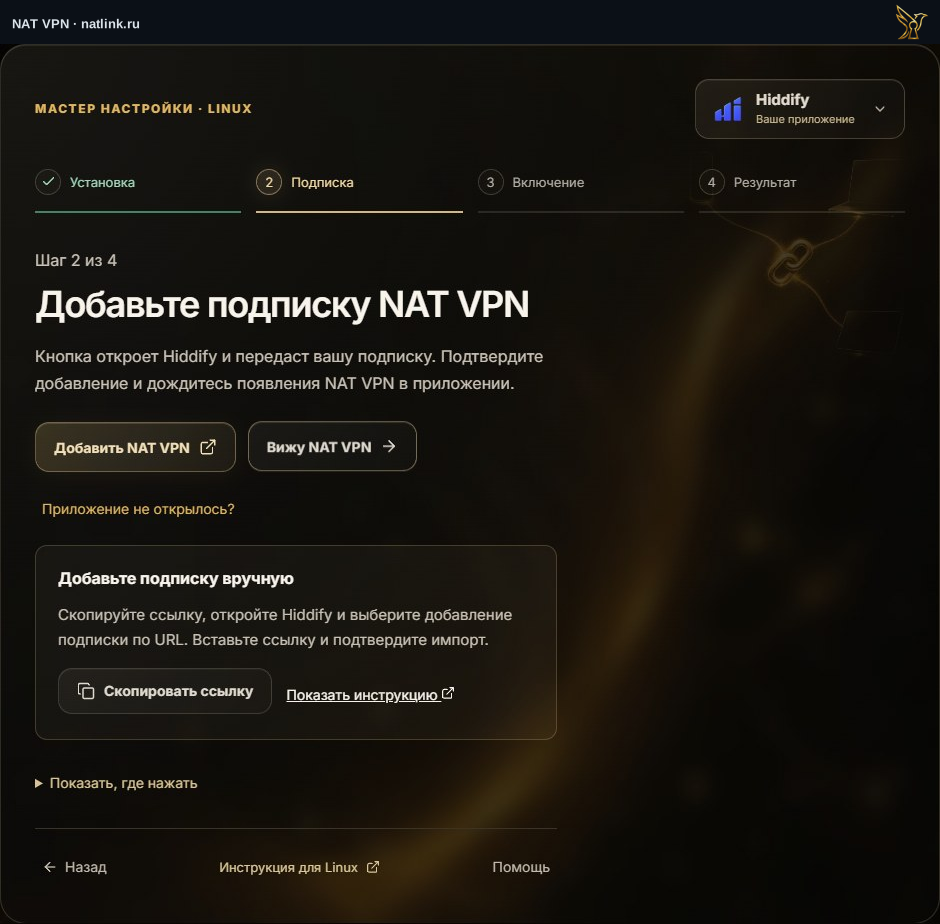
Russian NAT VPN dashboard for Linux, with Hiddify selected. This is a demonstration account; use your own subscription. The green outline marks the control.
Add a profile
In Hiddify, press + or New profile.
Paste your NAT VPN link
Choose to add from the clipboard.
For manual entry, use NAT VPN as the name, paste the link and save the profile.
Turn on VPN
Open Hiddify, select the NAT VPN profile and connect.
If Auto is available, use it for automatic selection.
On first launch, confirm the system VPN permission if prompted.
Check the result
Open a website or the app you need and check that it loads.
Then return to the NAT VPN setup wizard and press Everything works.
If there is no connection, open Support.

Russian NAT VPN dashboard for Linux, with Hiddify selected. This is a demonstration account; use your own subscription. The green outline marks the control.