 NAT VPN
Cannot import a VPN subscription: what to check
Distinguish between the app failing to open from the button and the app opening but failing to add a profile. These are different stages, and reinstalling everything usually does not help identify the cause.
The button does not open the app
Check that the chosen VPN client is installed on this device.
Open it manually once.
Return to the dashboard in a regular browser: Safari on iPhone, Chrome or another system browser on Android, or your computer browser on Windows.
A messenger’s in-app browser may not pass the link to an external app.
The app opened but no profile appeared
Check that you confirmed adding the profile inside the client.
For manual setup, choose subscription import by URL and paste the entire fresh personal link from your dashboard.
The natlink.ru home page or an instructions page is not a subscription link.
Do not publish your subscription link or QR code. For support, provide the app name, version, platform and error message without the secret link.
The profile exists but there are no connections
First check that the subscription is active in the dashboard, then refresh that profile inside the client.
The device needs internet access to download the list.
If refreshing fails, compare Wi-Fi and mobile data if possible.
Write down the exact error message.
The app reports an unsupported format
Open the current instructions and select your platform and the exact app you use.
Different clients support different formats and protocols.
Do not guess changes to server addresses or profile settings.
Update the client from its official source and retry import using the appropriate instructions.
When to contact support
If a fresh link will not import into a supported client, open Support in your dashboard.
Provide the device model, operating system, app, time of the attempt and network type.
Explain where setup stopped: opening the client, adding the profile or loading the list.
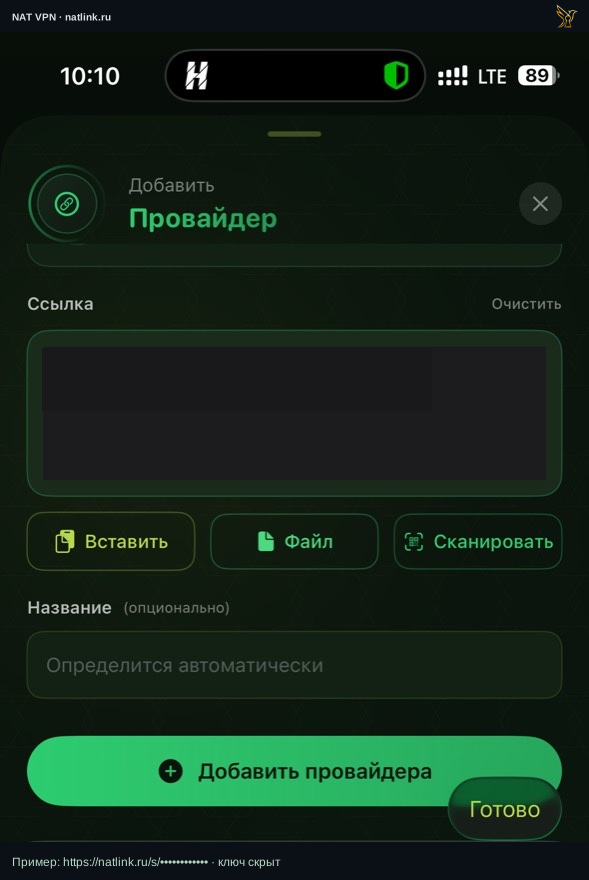 Press to expand the screenshot ↗
Open the full screenshot ↗Manual import example in the Russian Incy interface on iPhone. The personal link is hidden; use your own link from the dashboard.